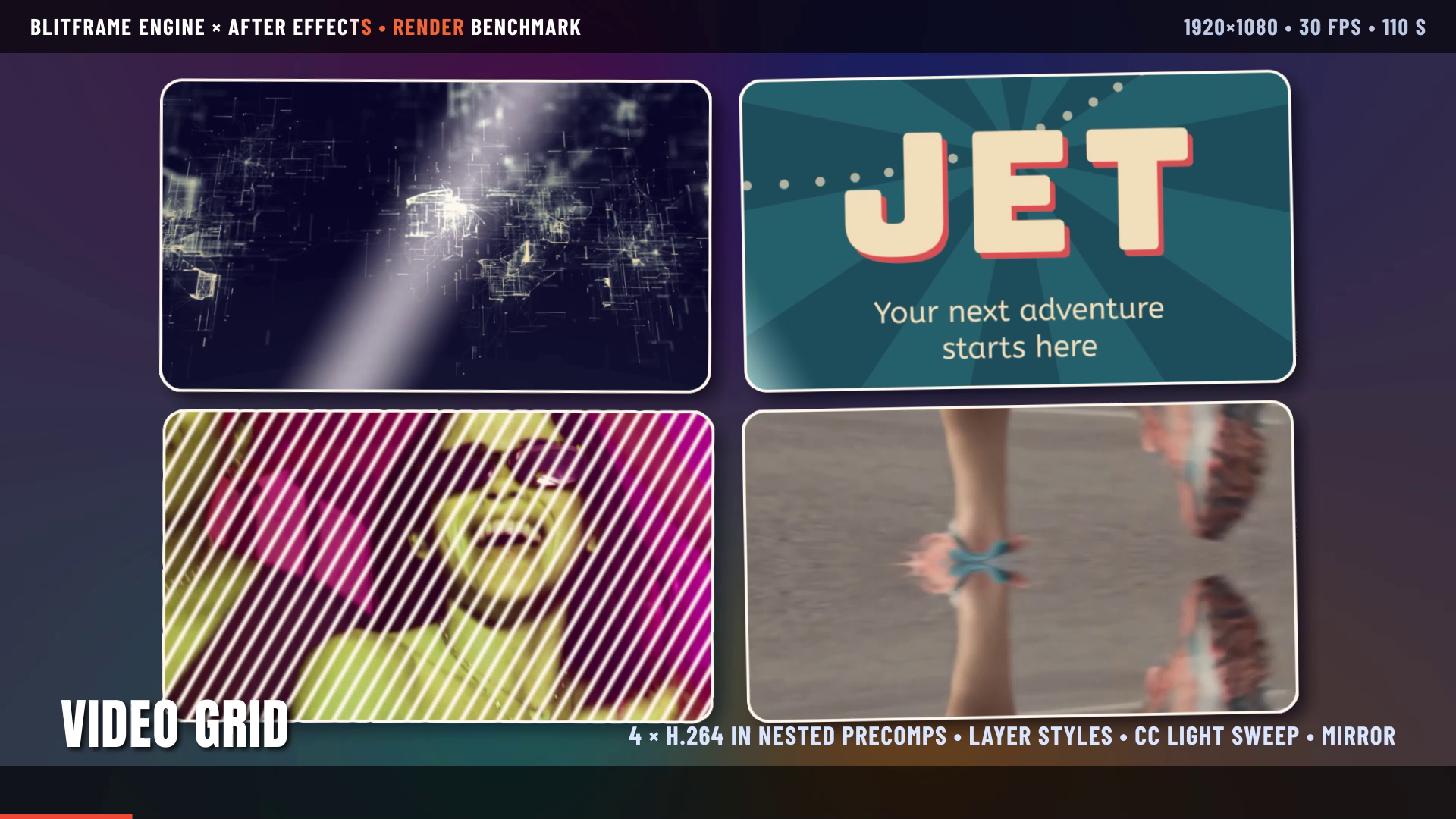
Speed claims are easy to make and hard to verify, so instead of saying Blitframe is fast, we measured it.
The test: one After Effects project (110 seconds, 1920×1080, 30 fps, 3,300 frames) built to be heavy for After Effects, with many video layers, effects, layer styles, nested precomps, track mattes, a 3D camera and animated text. Adobe After Effects 2026 rendered it headless with aerender.exe, the way it runs on a cloud render farm. Blitframe rendered the same project on the same machine: a Dell Precision 7550 with an NVIDIA Quadro RTX 3000, running Windows 11 Pro. We rebooted the machine and emptied After Effects' disk and media caches first, ran the two renders one after the other, each to a 15 Mb/s H.264 MP4, and timed each one from process start to process exit.
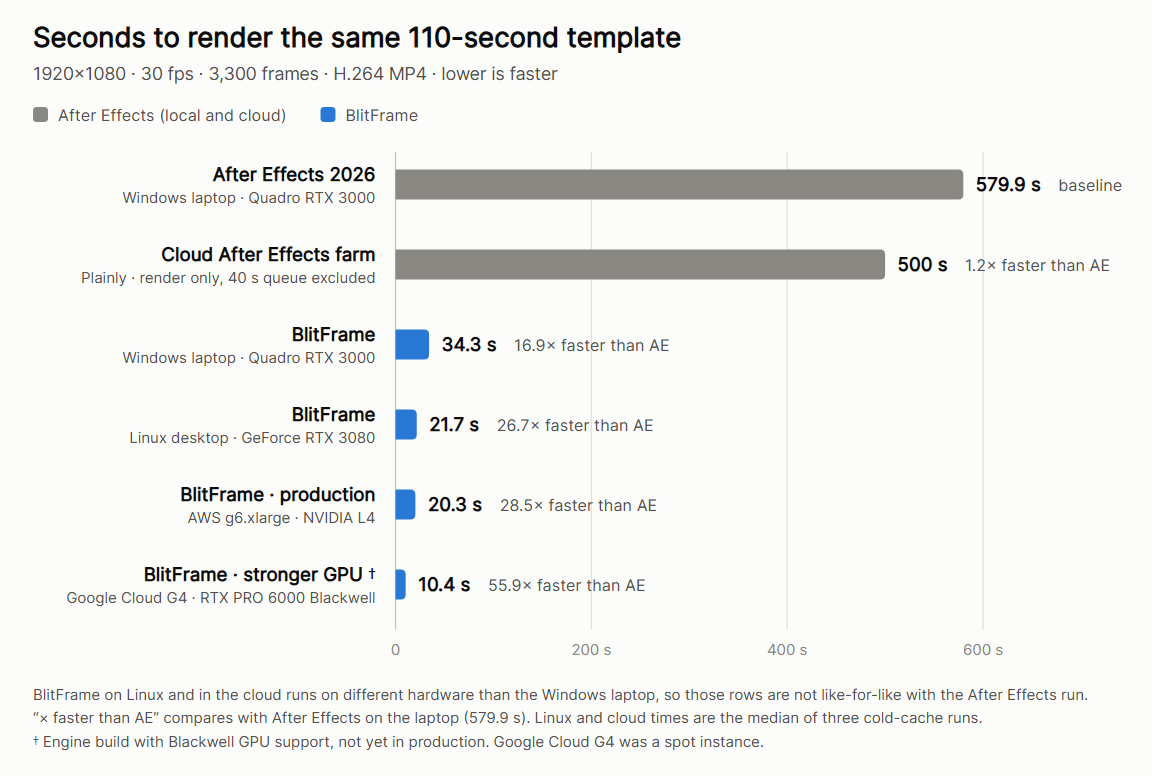
The result: After Effects took 9 min 40 s. Blitframe took 34.3 s, which is 16.9× faster.
We then ran the same project on a cloud After Effects render farm, and ran Blitframe on a Linux desktop and in the cloud:
| Setup | Hardware | Time | × real time | vs After Effects |
|---|---|---|---|---|
| After Effects 2026 | Windows laptop, Quadro RTX 3000 | 579.9 s (9 min 40 s) | 0.19× | baseline |
| Cloud After Effects farm (Plainly) | Not disclosed | 500 s (8 min 20 s) | 0.22× | 1.2× faster |
| BlitFrame | Windows laptop, Quadro RTX 3000 | 34.3 s | 3.2× | 16.9× faster |
| BlitFrame | Linux desktop, GeForce RTX 3080 | 21.7 s | 5.1× | 26.7× faster |
| BlitFrame, production server | AWS g6.xlarge, NVIDIA L4 | 20.3 s | 5.4× | 28.5× faster |
| BlitFrame, stronger GPU | Google Cloud G4, RTX PRO 6000 (Blackwell) | 10.4 s | 10.6× | 55.9× faster |
Plainly: render time only (the 40 s queue is excluded), with post-encoding turned off. Linux and cloud times are the median of three cold-cache runs.
The Linux and cloud rows run on different hardware than the laptop, so they are not like-for-like with the After Effects run. They show what the engine does on our production servers and how far it goes on a much stronger GPU.
Why it's this fast
Blitframe’s rendering technology is the result of almost two decades of building GPU accelerated real-time rendering systems for the video industry. The goal is to make possible the scenarios where video must update instantly: real-time, data-driven visualization such as sports betting, live-streaming campaigns and broadcast graphics, and AI-driven video creation, all without giving up the fidelity of pro - grade motion design.
LLM driven editing is a case where speed changes what is possible. An AI agent that creates or edits a video doesn’t render once: it generates a version, looks at the result, and revises it, many times. When each render takes minutes, that loop is too slow to use, and the agent can only afford a few attempts. When a render takes seconds, the agent can iterate freely, and a person waiting on the result sees changes almost as they are requested. Fidelity matters just as much: generated content only looks professional if it’s composited with real motion design, such as titles, lower thirds and animated layouts, and not with a simplified preview.
After Effects is a remarkable editor, and it carries what an editor must: backward compatibility with decades of projects, support for a huge range of hardware and platforms, and an architecture built around interactive editing. Blitframe has none of that to carry. It is not an editor, it has no legacy to maintain, and it targets a focused set of hardware. So it was designed from the ground up for one thing, performance, with rendering that is GPU-bound. You can think of it as what a renderer might look like if it only had to be fast. The trade-off is that we support most of the core and some of the effects of After Effects, not everything.
The test setup
The template. We built it around content known to slow After Effects down, using only features Blitframe supports. It has five scenes of 22 s joined by 0.5 s transitions, 17 video layers from 11 H.264 files (24, 25 and 30 fps; 720p, 1080p and vertical formats), three PNG stills (one at 4096×2160), 36 effect instances of 15 kinds, 18 layer styles on 12 layers, 5 adjustment layers, 13 precomps nested up to three levels, alpha and luma track mattes, a 3D camera, and 24 text layers (23 with per-character animators). Every layer is animated and looping clips are time-remapped, so no two frames are alike and After Effects can't reuse cached frames. Audio is disabled, so both outputs are video only.
The local machines.
- Windows laptop: Dell Precision 7550 on AC power (Core i7-10750H, 32 GB RAM, Quadro RTX 3000), Windows 11 Pro.
- Linux desktop: Dell Precision 3640 (Core i7-10700K, 32 GB RAM, GeForce RTX 3080), Ubuntu 24.04.
- On both, sources, project and outputs were on the same NVMe SSD.
Software and settings. After Effects 2026 (version 26.5.3), run headless with aerender, with NVIDIA hardware encoding enabled in the Media preferences and other render preferences at their defaults. Render queue item used default render settings with the output module "H.264 - Match Render Settings - 15 Mbps". Blitframe is GPU accelerated by default. For the output we set only the codec parameters: H.264 at 15 Mb/s with GOP 30. Its input was the same project exported from After Effects.
Run conditions - Windows Benchmark.
- The PC was rebooted before the runs, which cleared RAM and the OS file cache, and After Effects' disk and media caches were emptied.
- Blitframe loads its own exported assets, not After Effects' files or caches, so After Effects running first gave it no head start.
- The two renders ran one after the other, never at the same time: After Effects first, then the Blitframe Engine.
- After Effects was started headless (
aerender.exe -project benchmark.aep -rqindex 1), so the editor was not running. - Time was measured with an external stopwatch from process start to process exit. The tools' own timings were recorded alongside.
Run conditions - Linux and cloud.
Each Linux machine, including the cloud ones, was run three times from a cold cache, and we report the median. On the desktop we couldn't drop the system-wide OS cache without root, so before each run we evicted every input from the OS page cache (the export and footage, fonts, kernels, the engine binary and its libraries) and confirmed that 0 MB of them was resident at the start.
The cloud farm - using Plainly.
The same benchmark.aep was uploaded to Plainly AE render farm and rendered once, H.264 output at 15 Mb/s CBR. We disabled the post encoding pass, so the file we measured is After Effects' own output and the time is the rendering itself. The job took 9 min, 40 s of it queued, leaving 500 s of rendering. Plainly does not disclose the hardware it renders on.
Output. Both local renders are H.264 Main, yuv420p, 1920×1080, 30 fps, 3,300 frames (110.00 s). After Effects produced 214.9 MB at 15.6 Mb/s. Blitframe produced 206.3 MB at 15.0 Mb/s. The Plainly file is 205.2 MB at 14.9 Mb/s.
Results
On the Windows laptop: Blitframe vs After Effects
| Measure | After Effects 2026 | Blitframe Engine | Blitframe faster by |
|---|---|---|---|
| Total wall-clock time | 579.9 s (9 min 40 s) | 34.3 s | 16.9× |
| Startup (launch, init, project/scene load) | ≈ 13 s | 2.8 s | 4.6× |
| Frame rendering + encoding | 552 s | 30.2 s | 18.3× |
| Average render time per frame | 167.3 ms | 9.2 ms | 18.3× |
After Effects needs about five times the video's length to render it. BlitFrame renders it faster than real time.
After Effects cloud render farm ( via Plainly)
Blitframe (34.3 s) was 14.6× faster than the Plainly render (500 s). The cloud render took 80 s less than After Effects on the laptop, about 1.16× faster. A render farm adds capacity, but one render is still an After Effects render.
Linux and cloud
| Setup | Three runs | Median |
|---|---|---|
| Linux desktop (RTX 3080) | 21.64 s, 21.69 s, 22.60 s | 21.7 s |
| Production server (AWS, NVIDIA L4) | 20.1 s, 20.3 s, 20.4 s | 20.3 s |
| Google Cloud G4 spot (RTX PRO 6000) | 10.3 s, 10.4 s, 11.0 s | 10.4 s |
After Effects doesn't run on Linux, so there is no After Effects result on these machines. The speed-ups in the intro table compare each run with After Effects on the laptop. On our production servers, a 110-second video renders in about 20 seconds.
Why we tested it this way
- Heavy on purpose. The template stresses After Effects, and it resembles the content programmatic video needs when quality can't be traded away for speed. It uses only features Blitframe supports, so it isn't a test of everything After Effects can do.
- Cold start counts. In programmatic scenarios every job is a new one, so startup time is a real cost. Timing each run from process start to process exit includes it.
- Same machine, same output. This removes hardware and settings as variables.
- A fair setup for After Effects. We ran it headless with aerender, the way render farms run it, with hardware decoding and encoding enabled, and on Plainly we turned off the post-encode pass.
- Honest limits. Each tool ran once on Windows, so those are single measurements. On Linux and in the cloud we report the median of three runs.
Where the difference is much smaller
A heavy template shows Blitframe at its best, so it's fair to say where the gap narrows. We expect it to be much smaller when:
- the template is light, with simple 2D layers, few video streams and no heavy effects;
- frames repeat or barely change, so After Effects' caching helps it;
- the job is a large batch of variations, where a farm's parallelism makes up much of the difference in total throughput;
- the output is dominated by encoding, such as very high bitrates or large frames.
Who should use Blitframe
Blitframe is for teams where latency matters as much as quality: live, data-driven graphics such as sports and betting visualizations, broadcast and live-streaming campaigns, AI video agents that render many iterations, and high-volume programmatic video. If you need full After Effects feature coverage, you're doing one-off projects, or you only need simple banners, a render farm or a web-based renderer is the better fit.
These numbers come from one template, so your results will depend on your content. But the value is the same whatever you render: Blitframe is for teams that need speed, scale and fidelity at the same time, without trading one for another. The quickest way to see what that looks like for your content is to try it.
Follow the Getting Started tutorial
Try Blitframe now