Text fitting
View as MarkdownText fitting keeps longer copy inside a template's design. It shrinks, grows or wraps the text layers you name until they fit their space.
Add the rules
The rules live in text_fitting.json, at the root of the version next to data.json. This file shrinks the layer named Price, so its new copy is never wider than the original copy was:
{ "layers": [{ "nm": "Price", "textFit": { "shrink": "toFit", "region": { "source": "originalBounds" } } }] }
Add it with an edit, like any other file:
POST /v1/projects/{projectId}/versions
{
  "files": [
    { "path": "text_fitting.json", "content": "{ \"layers\": [ { \"nm\": \"Price\", \"textFit\": { \"shrink\": \"toFit\", \"region\": { \"source\": \"originalBounds\" } } } ] }" }
  ],
  "textFittingBaselineVersionId": "4f0a…"
}
Then change the copy as usual, with replacements or a new data.json. Blitframe fits the text whenever it renders or exports a version. It never changes the files in your version.
textFittingBaselineVersionId is optional. It names the version whose text originalBounds measures (baseline version).
Read the rules back with GET /v1/versions/{versionId}/files/text_fitting.json. It redirects (302) to the file, so follow the redirect (curl -L). To remove the rules, edit the project with "delete": ["text_fitting.json"]. Earlier versions keep their file, so restoring one brings it back.
All requests go to https://blitframe.codeartworks.com with an Authorization: Bearer <api key> header.
Examples
A headline in its paragraph box
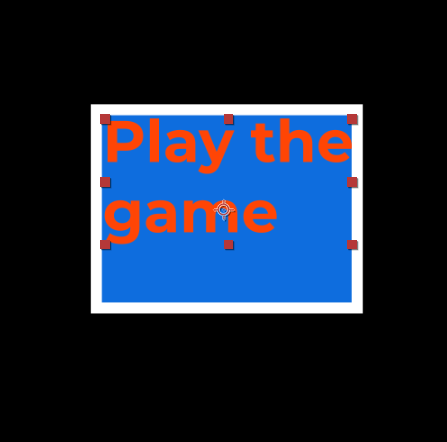
A paragraph text layer named Headline says "Play the game". When the copy becomes "Play the game now", the box has no room for the last word, so it is not drawn:
This rule shrinks the text until every line fits inside the box, and never below 6 pixels:
{ "layers": [{ "nm": "Headline", "textFit": { "shrink": "toFit", "region": { "source": "box" }, "minSize": 6 } }] }
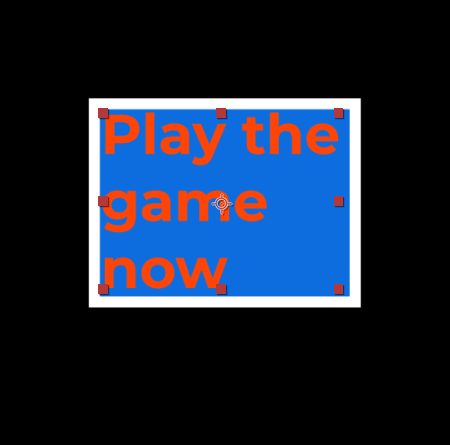
A box region always wraps, so "wrap": true is not needed. Shorter copy keeps its size: grow does not enlarge wrapped text in a box region.
A price on its badge
A text layer named Price sits on a shape layer named priceTag_bg:

This rule sizes the price to the badge's width, less a 10-pixel margin on each side. A longer price shrinks and a shorter one grows, between 8 and 200 pixels:
{
  "layers": [
    {
      "nm": "Price",
      "textFit": {
        "shrink": "toFit",
        "grow": "toFill",
        "region": { "source": "layer", "ref": "priceTag_bg", "margin": 10 },
        "minSize": 8,
        "maxSize": 200
      }
    }
  ]
}
Without wrap, only the size adapts to the badge's width. Use point text, and give the badge a name no other layer has (layer regions).
The text fitting file
A file with two rules:
{
  "layers": [
    {
      "nm": "Price",
      "textFit": {
        "shrink": "toFit",
        "grow": "toFill",
        "region": { "source": "originalBounds", "margin": 10 },
        "minSize": 8,
        "maxSize": 200
      }
    },
    {
      "nm": "Headline",
      "textFit": { "wrap": true, "shrink": "toFit", "region": { "source": "box" }, "maxLines": 2 }
    }
  ]
}
| Field | Meaning |
|---|---|
layers |
Up to 1,000 rules, one per text layer. |
layers[].nm |
The exact, case-sensitive name of one text layer in data.json, 1 to 200 characters. It can be in the main composition or in a precomposition it uses, at any depth. No other text layer may have the same name, and each name appears once in the file. |
layers[].textFit |
How to fit that layer (textFit fields). |
Only the layers you name are fitted. Fitting changes:
- the font size, and the line height with it, in proportion,
- the line breaks, when the text wraps,
- the position, only for a
layerregion withwrap: true, which centers point text in that layer, - keyframes, only to keep sliding text hidden off frame (moving text).
Blitframe measures text the way the engine draws it (how text is measured).
textFit fields
| Field | Values | Meaning |
|---|---|---|
region |
Object | Required. The space to fit into (region sources). |
wrap |
true, false (default) |
Break the text into lines at the region's width. Line breaks already in the text are kept. A box region always wraps, because the engine wraps paragraph text at its box width. |
shrink |
none (default), toFit, lastResort |
toFit reduces the font size until the text fits. lastResort reduces it only when the text needs more than maxLines lines or is taller than maxHeight. |
grow |
none (default), toFill |
Enlarge text that does not wrap until it nearly fills the region's width, and fits its height, up to maxSize. |
maxLines |
Positive integer | The most lines the text may take. |
maxHeight |
Pixels | The tallest the text block may be. |
minSize |
Pixels, default 1, at most 10000 |
The text never shrinks below this size, and text set smaller is raised to it. |
maxSize |
Pixels, at least minSize, at most 10000 |
The text never grows beyond this size. |
clampToComp |
true, false (default) |
Also keep the text within the width of the composition it is in. For text in a precomposition, that is the narrowest precomposition layer that shows it. |
The fitted size is a whole number of pixels, rounded down. If no whole size between minSize and maxSize fits, it keeps its fraction. A layer region treats some fields differently (layer regions).
Text that can't fit renders at the smallest size the rule allows: minSize when the rule shrinks it, otherwise its own size. It overflows its region rather than getting smaller. The version still renders, and its warnings name the layer and the limits it hit. Shorten the text or change the limits.
Region sources
source |
Other fields | Fits into |
|---|---|---|
box |
margin |
The layer's own paragraph box (sz in its text document): its width and height. Point text and text on a path have no box, so use another source for them. |
originalBounds |
margin |
The width the layer's text had in the baseline version: its widest line as drawn, wrapped at its box width when it has a box. Use it to keep new copy within the space the original copy took. |
layer |
ref (required), margin |
The bounds of another layer, such as the shape behind a price (layer regions). |
rect |
rect (required), margin |
An explicit [x, y, width, height] in composition pixels. Its width and height set the space. The text stays where it is. |
marginis space in pixels kept from each edge of the region.- With
originalBounds,minSizeandmaxSizescale with the layer's font size. When itssis twice the baseline's, both limits double. - On a layer that has a paragraph box, the
originalBoundsandrectsources also keep the text within the box. The engine wraps it at the box width and draws a line when at least half of it fits the box height. It always draws the first line.
Layer regions
The engine fits a layer region itself, so it has its own rules:
refis the name of a shape, solid, image, video, 3D model, precomposition or adjustment layer in the same composition as the text. An adjustment layer counts only with its effects and its sizeswandsh.- The engine uses the first layer in the composition's
layerslist with therefname. If that layer is the text itself, or another kind such as a null or a camera, the text keeps its own size. Give the region layer a unique name. - The fit is worked out once, before the first frame, from the two layers' position, anchor point and scale. It does not follow their animation, rotation or parenting.
- With
wrap: true, the text block is centered vertically in the referenced layer and keeps its paragraph alignment (j). - With
wrap: false, only the size adapts to the layer's width, measured from the widest line before any wrapping. - Use point text. On paragraph text the box still applies (layer region details).
Some fields work differently on a layer region:
| Field | On a layer region |
|---|---|
shrink |
lastResort acts as toFit. |
grow |
Text that does not wrap grows until its widest line spans the layer's width exactly, whatever its height. Wrapped text grows too, until it fills the layer's height. |
minSize |
Applies only with shrink, and then text set smaller is raised to it. Without shrink, the text keeps its size. |
| Size rounding | Without wrap, the size always keeps its fraction. With wrap, it always rounds down, even below a fractional minSize. |
maxLines, maxHeight, clampToComp |
Not applied. |
Baseline version
originalBounds measures the text a layer had in another version, its baseline. The baseline is not in the file: Blitframe keeps it with each version as textFittingBaselineVersionId.
- When text fitting is added or replaced, the baseline is the version the change was made on. An edit can pick another version with
textFittingBaselineVersionId, from the history of the variation it edits (mainby default), with adata.json. When there is no earlier version with adata.json(a new project), the version is its own baseline. - An edit that sends
textFittingBaselineVersionIdmust leavetext_fitting.jsonin the new version, or it is refused with400. An edit that only picks a different baseline creates a new version with the same files. - A ZIP import that contains
text_fitting.jsonis always its own baseline, even into a project with earlier versions. To measure against an earlier version, edit the project afterwards withtextFittingBaselineVersionId. - Later edits that leave the file as it is keep the baseline, so changing the copy afterwards still measures against the original. So do renders with replacements: each render's copy is measured against the pinned version's baseline.
- Duplicating a project copies the baseline along with the version, so the copy fits text the same way.
- Removing the file clears the baseline.
The text being fitted always comes from the version being rendered.
Rules in data.json
A text layer can also carry one rule in its own text data, t.textFit in data.json, with the layer source only. It follows the layer region rules, and the format reference lists how the engine reads its fields. The engine ignores an inline rule with any other source, and the version's warnings say so.
When the text fitting file has a rule for the same layer and that rule is applied, the inline one is ignored. A file rule that is not applied (checking and rendering) leaves the inline rule in force.
Moving text
Text that slides in from outside the frame, or leaves it, is moved out a little further when its copy gets longer. So it still starts and ends fully hidden. This applies to every text layer whose rule is applied, in the file or inline.
When the layer's first or last position keyframe is outside the frame, Blitframe pushes that keyframe further out. It goes just far enough to keep everything the text draws outside. That includes:
- the fitted text with its stroke and baseline shift (paragraph text with its box and one more line),
- what its Drop Shadow, Glow, Gaussian Blur and Fast Box Blur effects draw around it,
- what its stroke, drop shadow and outer glow layer styles draw around it.
Positions on screen, timing and easing don't change. These layers are left as they are:
- layers with a parent, 3D layers (with an X rotation
rx) and layers with animated rotation or an animated anchor point, - layers whose position is driven by an expression,
- layers with Corner Pin, CC Power Pin, Mirror, CC Cylinder or Transform, which can move the text anywhere,
- text fitted to a
layerregion withwrap: trueorgrow: toFill, which the engine resizes and moves after Blitframe measures it.
Like the rest of fitting, this happens when Blitframe renders or exports. Your data.json keeps its own keyframes.
Checking and rendering
Blitframe checks text_fitting.json against the version's data.json and fonts whenever a version that contains it is created and has no problems. On a version with problems, only the file itself is checked. Fitting never stops a version from rendering. Each fault is listed in the version's warnings with the field or layer at fault. Most faults leave their rule unapplied, so that text renders as written (every fault).
Fix the rules in another edit. The warnings of the new version show what is left. Inspect the layers of a version to see textFit: true on every layer a rule applies to. A version with problems shows none. If fitting itself fails while a version renders, the render draws all text as written, without its inline rules either.
Fitting measures text with the font files the composition uses, in the version or the font library. It reads only TTF and OTF files. A WOFF or WOFF2 font still renders, but its text is not fitted. To fit it, add a TTF or OTF copy of the font. Render a few frames to check the result, especially for text with animators, effects or 3D.
A version export of a renderable version contains data.json with the fitting already applied. It leaves the text fitting file out, so the ZIP renders exactly like the version.
MCP
Agents add text_fitting.json with the edit_project tool, including textFittingBaselineVersionId, and read it with read_file. See MCP for agents.
Details
How text is measured
- With the font's own advances and kerning, and the layer's tracking. Accents and other marks take no space.
- Lines break after a space,
-or/, and at every\r,\nor ETX (\u0003). Each one is a break, so\r\nmakes two. - At most 64 lines and 16,383 characters are measured.
- Fitting never picks a size that splits a word. A word too wide for the line makes the text smaller, or makes it unable to fit.
- Text that still cannot fit renders as the engine lays it out. The engine breaks a word wider than the line where it overflows. A letter wider than the line ends the text there, and nothing after it is drawn.
- Joining scripts (Arabic) and the font's own glyph compositions are measured from the unjoined characters. Render a few frames of such copy to check it.
Size checks
A fitted layer's font size (s) must be positive, and it and the line height (lh) must be at most 10,000 pixels, or its rule is not applied. Without lh, or with an lh of 0 or less, the line height is 1.2 times the size, as the engine draws it. This check covers the box, originalBounds and rect sources. A layer region is fitted while rendering and is not checked in advance, so check those layers with a frame render.
Layer region details
- The engine fits at most 15 text layers to a
layerregion in each composition, in layer order, counting inlinet.textFitrules. - The text keeps its own size, and the version's
warningssay so, when:- its rule is past the fifteenth,
- no layer has the
refname (an audio layer does not count), - the first layer with that name can't be fitted to,
- the
marginleaves no room inside the layer, or the text layer's scale is 0 on either axis.
- The text also keeps its own size, without a warning, when the region is a shape layer that draws nothing or the text's size is 0. The version still renders in every case.
- Blitframe checks the margin in advance only for solid, adjustment, precomposition, image and video regions with a fixed scale. For a shape or 3D model region, or an animated scale, check it with a frame render.
- With
wrap: true, the engine writes its line breaks into the text. A text animator based on lines, and line grouping, follow the fitted lines. Text past the 64th line, or from a letter wider than the layer on, is left out. - With
wrap: truebut withoutshrinkorgrow, the text only wraps at the layer's width and the size is rounded down. Text that does not fit overflows, and a word wider than the line breaks where it overflows. - With
wrap: true, lines break after a space,-or/and at each line break, which stays a single break. A size at which a word has to break does not count as fitting. - On paragraph text, the box still applies. The lines wrap at the box width and align within it. The box shows a line when at least half of it fits its height, and always shows the first line. The block is not centered, and the version's
warningspoint this out. - With
wrap: trueon paragraph text, the box's top-left corner moves to the point where the engine would anchor centered point text. That is the layer's left edge, center or right edge, by alignment, at the first line's baseline. So the text sits lower than centered, and further right with center or right alignment. - For paragraph text, the rule is not applied, with a warning, when the fitted size would leave nothing to draw in the lines the box shows. That happens, for example, when the first letter is wider than the box. Such text would stop the render.
- For paragraph text, the rule is also not applied, with a warning, when Blitframe cannot tell the fitted size in advance. That happens with a shape or 3D model region, or an animated scale, while
growhas nomaxSize. It also happens with a font it cannot measure, whenever the rule can make the text larger than it is. Point text is fitted regardless.
Faults
Each fault is listed in the version's warnings, and the version still renders (checking and rendering).
| Fault | Result |
|---|---|
| The file is not valid JSON, has an unknown field or a value out of range, or names a layer twice. | No rule is applied. |
| A rule's name matches no text layer, or more than one. | That rule is not applied. The other rules still are. |
| The text is in a precomposition the main composition never uses, so the engine never draws it. | That rule is not applied. |
A box region is on point text. |
That rule is not applied. |
| The baseline can't be read, or a font can't be measured. | That rule is not applied. |
| The font size or line height is out of range (size checks). | That rule is not applied. |
| The fitted size would leave nothing to draw in the lines the text's box shows, for example because the first letter is wider than the box. Such text would stop the render. | That rule is not applied. |
A layer region can't be applied (layer region details). |
The text keeps its own size. |
| The text can't fit. | It renders at the smallest size the rule allows (minSize when the rule shrinks it, otherwise its own size) and overflows. |